
Let me be honest with you when I first heard AI workflow automation thrown around in meetings a couple of years back, I rolled my eyes. It sounded like another buzzword that would fade by Q3. But here we are in 2026, and I’ve watched this thing go from niche experiment to the backbone of how teams actually get work done.
If you’re still manually copying data between spreadsheets, chasing approvals through email chains, or spending hours on repetitive tasks that a script could handle in seconds this article is for you.
What Actually Is AI Workflow Automation?
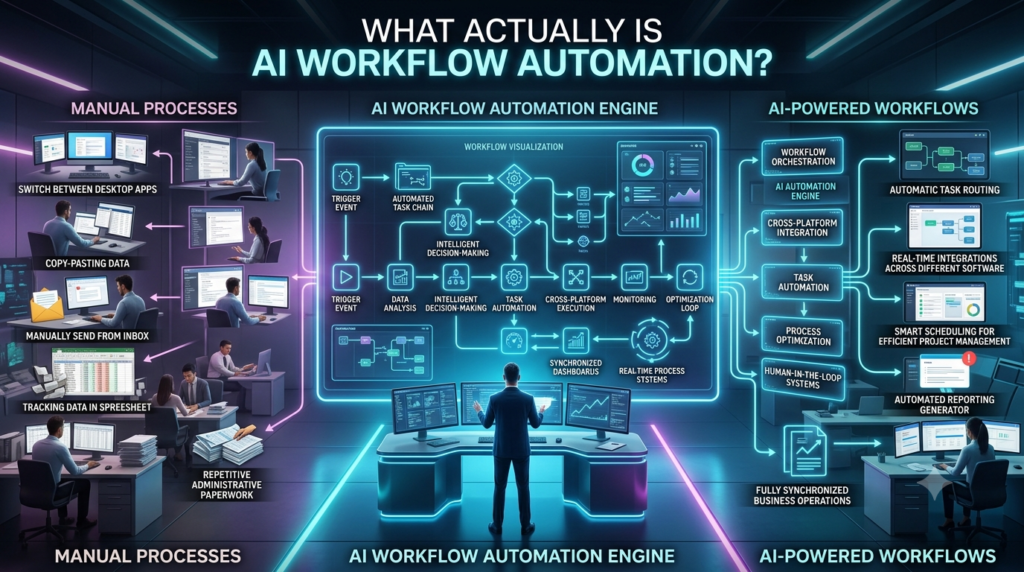
Forget the hype for a second. At its core, AI workflow automation means using intelligent tools to handle sequences of tasks without you micromanaging every step. It’s not just automation like setting up a basic Zippier trigger. The AI part means the system can make decisions, adapt to new inputs, and even learn from what went wrong.
Think of it this way: traditional automation is a train on fixed tracks. AI workflow automation is more like a self-driving car it knows the destination, but it figures out the best route in real time.
A real example from my own experience: I worked with a mid-sized e-commerce company last year. Their customer support team was drowning in ticket triage. They implemented an AI workflow that read incoming tickets, categorized them by urgency, drafted initial responses, and routed complex ones to the right agent. Response time dropped by 60%. Not because anyone worked harder because the workflow handled the boring stuff automatically.
Where It’s Actually Being Used Today
The applications are broader than most people realize. Here’s what I’m seeing in the wild right now:
Content pipelines: Marketing teams use AI to generate first drafts, route them for editing, schedule publishing, and even repurpose content across platforms. What used to take a week now takes a day.
HR onboarding: New hire paperwork, IT provisioning, welcome emails all triggered automatically when someone accepts an offer. I’ve seen companies cut onboarding time from two weeks to three days.
Finance and invoicing: AI reads invoices, extracts line items, matches them to purchase orders, flags discrepancies, and routes approvals. One accounting firm I spoke with said it eliminated roughly 15 hours of manual work per week per employee.
Sales outreach: Tools now personalize cold emails at scale, follow up based on engagement signals, and update CRM records without a sales rep touching anything.
The Honest Limitations Nobody Talks About
Now, I’m not here to sell you a fantasy. AI workflow automation has real limitations, and ignoring them will cost you.
First, garbage in, garbage out still applies. If your data is messy, your automated workflows will make messy decisions at scale which is way worse than a human making a messy decision once.
Second, there’s a maintenance cost. These systems aren’t set-it-and-forget-it. Workflows break when APIs change, when team processes shift, or when the AI misinterprets something. You need someone usually a dedicated ops person watching the dashboard.
Third, and this is the ethical piece I care about: automation without oversight can amplify bias. I’ve seen hiring workflows that quietly deprioritized candidates from certain zip codes because the training data reflected historical hiring patterns. That’s not a tech problem. That’s a people problem that tech made faster.
How to Actually Get Started (Without Burning Budget)
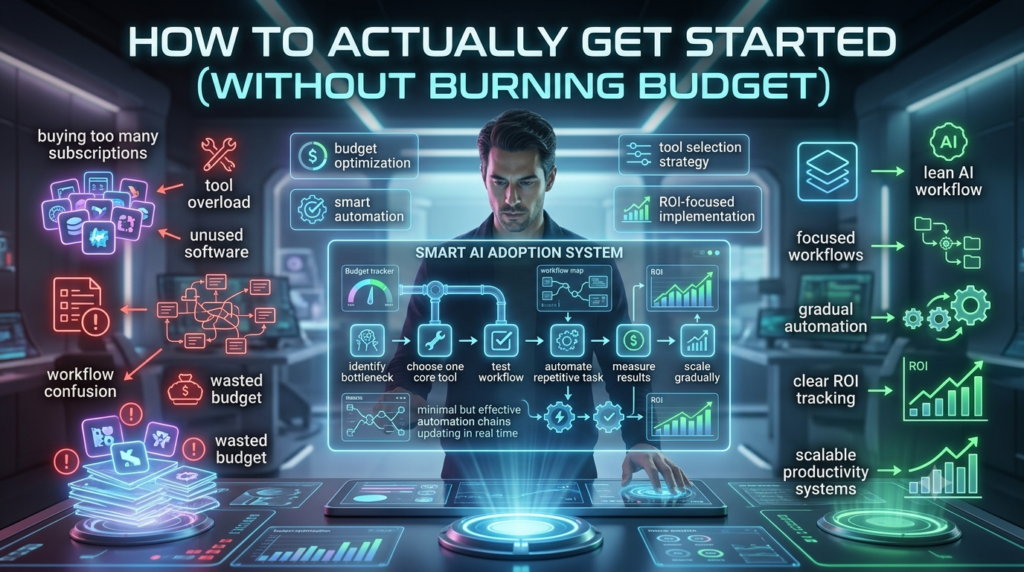
You don’t need a six-figure enterprise platform. Here’s what I’d recommend if you’re starting from scratch:
- Audit your workflows first: Map out what your team actually does daily. Look for tasks that are repetitive, rule based, and high volume. That’s your low hanging fruit.
- Start with one workflow, not ten: Pick the one that annoys your team the most. Automate it. Measure the results. Then expand.
- Use tools that play nice together: Platforms like Make, n8n, or even Zapier paired with AI agents (think Claude, GPT-4 integrations) give you flexibility without locking you in.
- Build in human checkpoints: For anything involving customer facing decisions or sensitive data, keep a human in the loop. Automation should assist, not replace judgment.
A friend of mine who runs a 12-person agency started with just one workflow auto generating project status reports from their Asana data. It saved them four hours a week. That small win gave them the confidence to automate invoicing, then client onboarding. Within six months, they’d reclaimed roughly 20 hours per week across the team.
The Bigger Picture
AI workflow automation isn’t about replacing people. It’s about stopping people from doing work that doesn’t require people. The teams that figure this out early aren’t just more efficient they’re more creative, less burned out, and honestly, more fun to work with.
The companies that wait? They’ll eventually catch up, but they’ll spend the next two years playing defense while the early movers build real momentum. The workflow revolution isn’t coming. It’s already here. The only question is whether you’re riding it or watching it pass by.
FAQs
Q: Is AI workflow automation only for big companies?
A: No. Small teams with 5–10 people can start with affordable tools and see real ROI within weeks.
Q: Do I need to know how to code?
A: Not anymore. Most modern platforms use visual builders and natural language prompts.
Q: What’s the biggest mistake teams make?
A: Trying to automate everything at once instead of starting with one high-impact workflow.
Q: Can AI workflows make mistakes?
A: Yes that’s why human oversight and regular audits are essential, especially for customer-facing or financial processes.
Q: How much time can you realistically save?
A: Depending on the workflow, most teams see 20–40% time savings on repetitive tasks within the first 3 months.