
For years I kept my life in scattered notebooks, messy folders in Evernote, and random voice memos that I never listened to again. Ideas disappeared. Connections between projects went unnoticed. Research from six months ago might as well have never existed. Then I started experimenting with AI note taking apps, and everything shifted.
What began as curiosity became a daily necessity. After testing nearly every major platform over the past three years both for my own writing and while consulting with teams at scaling startups I’ve seen firsthand how these tools have moved from clever gimmicks to genuine cognitive extensions. They don’t just store information. They understand it, organize it, and surface it at the exact moment it becomes useful.
What Makes an AI Note Taking App Different
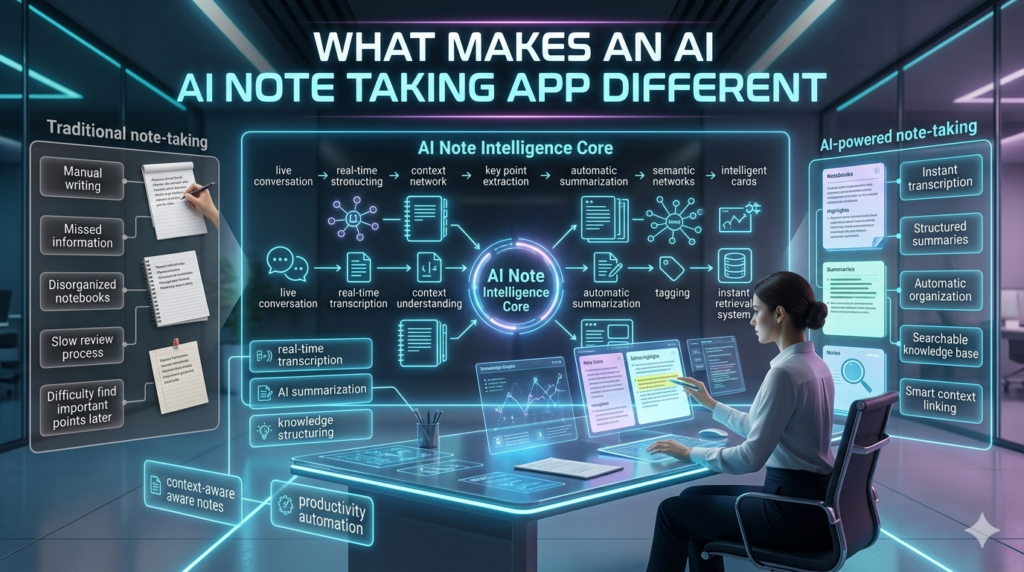
Traditional note-taking apps are filing cabinets. AI note taking apps are research assistants, memory augmenters, and pattern recognizers rolled into one. The difference lies in several breakthroughs that have matured since 2023. Modern systems use large language models to go far beyond simple keyword search. They understand context and intent. You can ask an AI note taking app, “What did I write about decision fatigue last year?” and it will pull not only the exact note but related observations you made during client calls, books you highlighted, and half-finished thoughts from your daily journal.
The best ones now offer:
- Automatic transcription and summarization: of voice notes, meetings, and even video calls
- Semantic search: that finds meaning, not just matching words
- Intelligent linking: that suggests connections between ideas you never explicitly linked
- Auto-tagging and organization: that improves the longer you use the system
- Knowledge synthesis: the ability to generate new insights by combining your existing notes
I remember one particular Tuesday morning. I had been collecting observations about team dysfunction for months across different projects. I typed one vague question into Mem, my primary AI note taking app at the time: patterns in struggling product teams. Within seconds it produced a coherent four-point framework built entirely from my own scattered notes, meeting transcripts, and marginalia. It even cited the original sources. That single moment convinced me these tools had crossed a threshold.
The Current Landscape in 2026
The market has matured rapidly. There is no single best AI note taking app the right choice depends on how your brain works.
Mem remains the purest expression of the AI-first philosophy. It treats every note as fluid. The AI aggressively organizes, suggests links, and creates smart groups that evolve over time. I’ve watched it get remarkably good at understanding my personal shorthand and recurring obsessions.
Reflect appeals to writers and deep thinkers who want beauty alongside intelligence. Its daily notes feature combined with an AI writing companion feels more like a thoughtful colleague than a piece of software. The backlink graph is clean and the AI-generated thought of the day often surprises me with relevance.
Notion AI wins for people who live in complex workspaces. Once you move beyond simple note-taking into databases, wikis, and project management, Notion’s AI capabilities become extremely powerful. The ability to ask an AI to “turn these meeting notes into a project plan with assigned tasks” still feels like mild sorcery.
Capacities has emerged as a dark horse for those who think in objects rather than plain text. Its object-based approach (treating Person, Project, or Concept as structured entities) combined with strong AI feels closer to how many of us actually experience knowledge.
Obsidian users have also joined the party through powerful local AI plugins. For privacy-conscious power users who want their notes stored locally but still crave intelligence, this combination has become formidable.
Even Apple has entered the conversation. Apple Intelligence features in Notes (rolled out more fully in 2026) offer surprisingly good on device intelligence for iPhone and iPad users who want seamless integration without another subscription.
Real Impact: Beyond the Hype
The real value shows up in unexpected ways. A friend who runs clinical trials now uses his AI note taking app to track subtle patterns across years of patient interviews. The system caught a recurring side effect theme that human reviewers had missed because it appeared in different contexts across 47 different notes.
As a writer, the benefit is more personal. When I’m stuck on an article, I can feed the AI note taking app my research folder and ask it to find the tension in all this material. The response almost always reveals an angle I hadn’t consciously noticed but had unconsciously circled for weeks.
The Limitations Nobody Talks About Enough
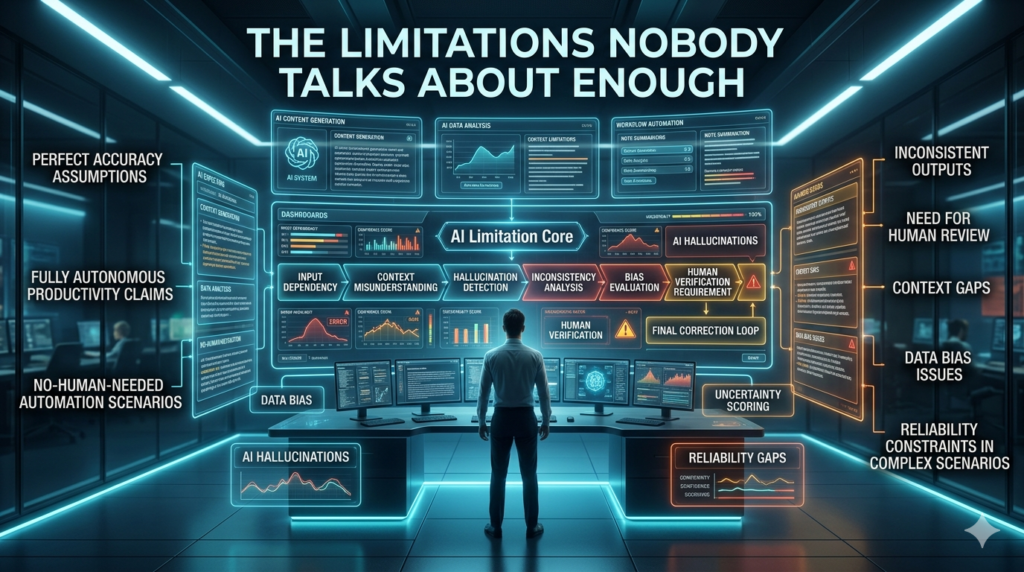
These tools aren’t perfect. I’ve seen the AI confidently make connections that seemed profound but were actually superficial once examined. There is still a certain hallucination risk when synthesizing your notes. More concerning is the subtle way these apps can change how you think. When an AI note taking app always offers to summarize your meeting, you may stop listening as carefully. When it always suggests connections, your own ability to spot patterns might atrophy slightly. I’ve had to consciously practice reviewing my raw notes without AI assistance to keep my thinking sharp.
Privacy matters too. You are feeding deeply personal material half-formed thoughts, client conversations, financial worries, creative struggles into these systems. I only use tools with strong encryption, clear data policies, and, when possible, local processing. Some of my most sensitive notes still live in a fully offline Obsidian vault.
How to Choose and Actually Use an AI Note Taking App
After years of trial and error, here’s my practical advice: Start simple. Pick one app and commit for at least 90 days. The magic compounds as the system learns your particular way of thinking. Develop a consistent capture habit. The AI performs better when it has high-quality raw material. I use a combination of quick voice notes while walking, quick captures on my phone, and more deliberate writing in the evening.
Review periodically. Set aside time each week to look at what the AI has surfaced. These tools work best as collaborators, not replacements for your own judgment. Don’t chase every new feature. The apps that will serve you longest are the ones whose fundamental philosophy matches how your mind works.
The Road Ahead
We’re still in the early chapters. The next wave of AI note taking apps will likely incorporate more multimodal understanding — seamlessly processing handwritten notes, whiteboard sessions, body language in meetings, and even emotional tone. Some teams are already experimenting with “second brain” systems that actively participate in your thinking rather than simply responding to queries. What excites me most isn’t the technology itself but the possibility that we might finally escape the cycle of information overload and digital forgetfulness that has defined knowledge work for decades.
After years of using these tools daily, I’ve come to see my AI note taking app as one of the highest-leverage investments I’ve made in my own capabilities. It hasn’t replaced my thinking. It has amplified it giving me the gift of a more reliable memory and a more connected mind. The question isn’t whether you should adopt an AI note taking app. It’s which one aligns with how you naturally think and work and how quickly you can build the habits that let its intelligence compound with yours.
FAQs
Q: What exactly is an AI note taking app?
A: It’s a note taking tool that uses artificial intelligence to automatically transcribe, organize, summarize, connect, and retrieve your ideas far more intelligently than traditional apps.
Q: Are AI note taking apps worth the subscription cost?
A: For most professionals and serious students, yes. The time saved and ideas recovered typically deliver strong ROI within the first few months.
Q: Which AI note taking app is best for students?
A: Reflect and Notion AI tend to work extremely well for students. Reflect offers a calmer experience for personal learning, while Notion excels at organizing course materials and research.
Q: How private and secure are my notes?
A: It varies significantly by platform. Look for end-to-end encryption and clear privacy policies. Some tools (especially those with strong local options like Obsidian) offer better privacy than cloud-first solutions.
Q: Can these apps accurately transcribe meetings?
A: In 2026, transcription quality is excellent for clear English conversations. Accuracy drops with heavy accents, multiple speakers talking over each other, or specialized jargon, though the AI often compensates during summarization.
Q: Will using an AI note taking app make me less creative or intelligent?
A: Only if you let it. Used thoughtfully, these tools free up mental energy for higher-order thinking. The key is maintaining active engagement with your own notes rather than passively consuming AI summaries.
Q: How long does it take to see real benefits?
A: Most people notice meaningful improvements within 3–6 weeks once they have 50–100 notes in the system. The more you use it, the more valuable it becomes.